Pages

5.18.2010

Daniusoft released their Mac Product - Daniusoft Video Converter for Mac

Daniusoft release the new product - Video Converter for Mac, it`s their first test for Mac users.


Product Page: Video Converter for Mac
Free Download link: Download Video Converter for Mac

Kerfeature:

Convert High-Definition and popular video
Support high-definition video formats like AVCHD (MTS, M2TS), HD MKV, HD WMV, MOD, HD TOD, HD MOV, HD FLV, HD TS, HD MPG, HD TRP. With Daniusoft Video Converter for Mac, you can easily convert HD video for your mobile devices, upload to YouTube.

Extract audio from videos
Support convert video files between all popular video formats like WMV, MP4, AVI, MKV, MPEG, MOV, M2TS, FLV, 3GP, ASF, VOB, DV, etc.

Support various multimedia devices
This Mac video converter supports a wide range of devices, including iPad, iPod, iPhone, PSP, Xbox 360, BlackBerry, Zune, Smart Phone, to name just a few. You can easily get the right format for your device.

Easy convert audio/video for various player and editor
Convert videos including MTS/M2TS, AVI, WMV, VOB, TS, ASF, MKV, etc for iMovie, iDVD, Final Cut Pro, iTunes, QuickTime, VLV Player, Windows Media Player, etc.

Other edit features:
1. Optimized settings for devices
2. Clip video
3. Crop the frame size of the video to retain the part you want. You can easily remove the black border of the movie and watch it in full screen.
4. Adjust the brightness, saturation and contrast of the video or add special effects like Old Film, Negative to personalize the video.
5. Merge several selected clips into one to create your own special video. 

By author: The fist version is better than I thought.Easy to use but not support convert DVD disc. But the Pro version will be released this week. Free try this software here: Daniusoft Video Converter for Mac


5.17.2010

Steve Jobs Would Run America Better Than Obama?

Last night,Bill Mahe - political pundit and comedian claimed that Steve Jobs Would Run America Better Than Obama, for those reasons:


1. Obama doesn`t know how to work an iPod

The comments, inspired by Obama`s recent claims that he doesn`t know how to work an iPod, point to Maher`s frustration with the conflation of backwardness and likability — shunning new-fangled gizmos is seen as endearing in America, he explains.

2. Steve Jobs know what America need

To Maher`s solution, bring in Steve Jobs to push the country forward:

"America needs to focus on getting Jobs" — Steve Jobs. Because something tells me that Apple would have come up with a better idea for stopping an oil spill in the Gulf of Mexico than putting a giant box on top of it.
In 2001, Apple reinvented the record player. In 2007, the phone. This year, the computer. I say, for 2011, we let them take a crack at America. Our infrastructure, our business model, our institutions. Get rid of the stuff that`s not working, replace it with something that does. For example, goodbye US Senate — Hello Genius Bar! So good luck, Steve — you`ll need it!”

The sentiments echo much of what’s being said about the two most controversial companies in the tech press right now: Facebook and Apple. While Jobs and Zuckerberg are seen as uncompromising, ruthless, even arrogant in their way of doing business, this decisiveness has also pushed tech forward in leaps and bounds.


5.12.2010

Apple iPhone 4G prototype appeared on Vietnamese

Apple has been losing the next generation iPhone left and right; about two months after an Apple iphone 4G left one on a barstool in California, a slew of images and a video of another iPhone 4G prototype appeared on Vietnamese site taoviet.vn.
 Here is the video of another iPhone 4G on youtube:


This new prototype is very similar to the one Gizmodo bought last month, but there are some minor differences; for example, this one lacks the screws at the bottom. Furthermore, this new device has been turned on, revealing an image of an explosion and the sign "Inferno" on the screen.


As always, it`s possible that this device is fake, although the number of images (including a full teardown of the device) and the video (embedded below), suggest it`s real.
 
Update: A closer look at the device`s innards reveals that the prototype appears to sport an Apple A4 microprocessor, similar to the one found in the iPad.
 
The Taoviet images suggest many of these details, including the different material of the backing, are also present in this newer purported prototype. If this device indeed represents another unauthorized leak, then Apple will likely respond as aggressively as it did to Gizmodo.

11.24.2009

How to copy DVD to Hard Drive?

How to copy DVD to hard drive so you can watch them without the disc? Is it possible to copy protected DVD to hard drive? Having the problem with your DVD collection that can only be playable on your DVD players?

As a big fan of Avril Lavigne, I have collected plenty of DVDs of her. But it is such a pity that I only can play them on my DVD players. I was totally at a loss when I want to copy my DVD to my hard drive and share them with my friends and family. My friends Angel helped me out. She said I may need a DVD Ripper.

If you too came across the same problem, I’d like to share my experience of copying DVD to hard drive here. It is also apply to copy DVD to computer hard drive. Copy DVD to Windows Movie Maker, you can learn it from here:
How to put DVD into Windows Movie Maker?

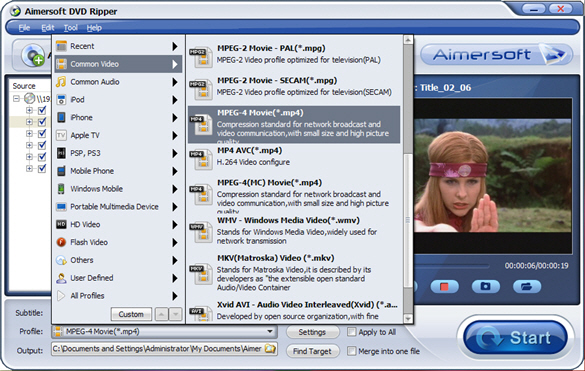
Personally I use the program named Aimersoft DVD Ripper. The following are the reasons why I choose this DVD Ripper.

1. Support all of the DVD to load, can copy protected DVD which is restricted by css, region code or other copy protection.
2. Copy DVD to SD (AVI, WMV, M4V, MP4, MOV, etc.) and HD formats like HD TS, HD AVI, HD WMV, etc.
3. Support various multimedia players such as iPod, iPhone, BlackBerry, etc.
4. Feature powerful editing functions
5. Support dual-core and multi-threading
6. 100% compatible with Windows 7

Helpful Tip: With DVD ripper, you can copy the VOB files from the DVD. But, since the VOB files are huge, I would recommend that you rip your DVD to another format like MP4 or AVI, the popular format, to save the space in your hard drive.

1. First, you should download DVD ripper, install and run it:
Free download DVD Ripper
2. Insert the DVD that you want to copy to your hard drive;
3. Upload your DVD files with “Add” or ”File” button, and DVD ripper automatically scans the DVD and displays all the files;

Helpful Tip: There are three options for you. You can add the DVD Folder, ISO File or IFO File.


4. Choose one or more files you want to copy to hard drive;

5. Select the output format by clicking “profile” drop-down list;


6. Select the output path to save your DVD to hard drive;
7. Click the button of “Start” and DVD ripper will do the ripping for you.
8. Within minutes, you can find your DVD on your hard drive and play it on your computer.

Helpful Tip: You also can click the button “Edit” to create your own DVD movies by cropping the frame size, trimming into several segments, merging several files into one, adding text or picture watermark, or adding special effects.

Enjoy the highest copy speed and the lossless quality while copying DVD to hard drive. Most important, it offers a Free Download. So why not give it a try? You will be surprised by this DVD Ripper.